

VAX Fleet Standard
AvailableFor small fleets of about 5–20 trucks with divided roles: owner, dispatch, billing, fleet manager and drivers each get their own workspace on the same records.
Product visual demo · demo data · © OpenStreetMap contributors
 NewLittle V · AI Operations Assistant
Web console, mobile app and Little V — one system, run together. In the office, the web console runs loads, dispatch, billing and the fleet. On the phone, drivers accept trips, work each stop and upload BOL/POD. Little V keeps progress in sync and coordinates the work around the same load. Built for small trucking fleets, starting with an AI-driven carrier TMS and the essential transport hardware.
One record per load, across the whole team.
Little V keeps things moving.
Little V keeps things moving. Important decisions stay yours.
The operating loop
Every update lands on the same record, shown to each role by their permissions. Little V follows that record and keeps both sides in sync.
Web · office
Same load record · sample
LA → Dallas
Little V syncs progress and routes each update to the right role.
Mobile · on the road
While driving, Little V keeps to short voice prompts and necessary reminders; screen work waits until the truck is parked.
See the actual product
Web console, driver app and Little V — redrawn from the running product with sample data. Open the real screen any time.
01/04
Open the demoWeb console
Dispatch · Web
01 / 04
Dispatchers work one board: the load queue, the live map and the exception queue side by side.
Sample data
Trucks
5
In transit
3
Unassigned
1
Awaiting POD
1
Load queueWhole fleet
VAX-1042
Los Angeles, CA → Dallas, TX
M. Lopez · T-112
VAX-1043
Los Angeles, CA → Chicago, IL
J. Chen · T-108
VAX-1044
Dallas, TX → Chicago, IL
D. Patel · T-115
VAX-1045
Chicago, IL → Dallas, TX
No driver yet
Operations mapVAX-1042
Los Angeles → Dallas62%
Loads
Queue + map

In the yard
Dispatch in the office, drivers in the cab — one record from the first assignment to the returned POD.
Why VAX
Small fleets need complete operating capability, not another disconnected tool. VAX starts with an AI-driven carrier TMS and the transport hardware you need, so dispatch, the driver's day and the paperwork run on the same record — and the office, the cab and billing stay in step.
01 · Dispatch
Dispatch creates the load and assigns a driver and truck on one board.
02 · Drive
The driver receives the trip in the app and updates each stop.
03 · Document
BOL and POD return to the same record; an authorized person checks the invoice draft.
VAX-1042
In transitLos Angeles → Dallas
M. Lopez · T-112 · 1,435 mi
Pickup · Los Angeles, CA
Loaded · BOL scanned
In transit · I-10 E
Driver stop updates
Delivery · Dallas, TX
Next stop
01 · Dispatch
Unassigned, assigned and in-transit loads, the operations map and the exception queue — in one screen your dispatchers keep open all day.
M. Lopez
Driver · T-112
Current tripVAX-1042
Los Angeles → Dallas
Next: Delivery · Dallas, TX
Scan BOL / POD
Report issue
Little V
Ask about your trip, pay or weather
Scan POD
VAX-1042 · Dallas, TX
POD
02 · Drive
The driver app shows the active trip, weather and traffic for the route, and quick actions to scan a BOL or report a roadside incident.

Little V
Little V
AI operations assistant
What needs attention today?
Here's today's summary:
Important decisions are yours to confirm.
Illustration with sample data — not connected to your records.
03 · Little V · AI Operations Assistant
Little V is the AI operations assistant for owners, dispatchers and drivers, connecting trucks, people, loads, paperwork and progress. Ask about open loads, missing PODs and progress — for example "Which PODs are still out today?" — and Little V helps sum up and follow up; you confirm important decisions. Office-side scope is confirmed for each fleet at onboarding. In the driver app, drivers talk or type in Chinese or English about their trip, pay, the time and the weather.
Our story
We have hauled contract freight and hunted spot loads every day. We have run dispatch, warehouses and driver hiring, learned to drive ourselves and worked on the repairs. We know the daily pressure and detail of a trucking business from the inside.
Our team understands both operations and technology. AI lets us bring the operating capability that used to belong to big carriers to small fleets.
Today we focus on an AI-driven carrier TMS and the essential transport hardware — Standard for 5–20 truck fleets, and Lite for owner-operators.
Two editions
Big-fleet operating capability, built for small fleets. Complete features, no need to become a TMS expert first: AI organizes information, prepares the work and coordinates the flow — you confirm what gets done.
VAX Fleet Standard
AvailableFor small fleets of about 5–20 trucks with divided roles: owner, dispatch, billing, fleet manager and drivers each get their own workspace on the same records.
VAX Fleet Lite
In developmentFor owner-operators and micro fleets: one person wears every hat, and one page shows the business. Not yet available to sign in.
Platform
Dispatch, driver, documents and safety — the capabilities carriers use every day.
Load flow
Interactive demoStatuses, documents and roles along the way from dispatch to invoice.
Invoicing
Interactive demoDelivered loads become invoice drafts, confirmed by your team.
Load
SIM-CHI-067
Invoice
demo
01
Delivered
Driver uploads the POD from the app.
Products
Dispatch, driver tools, documents, safety and bilingual help, organized in one place.
 TMS
Your fleet's operating system.
Explore TMS
 Dispatch
Every load in view.
See dispatch
 Devices
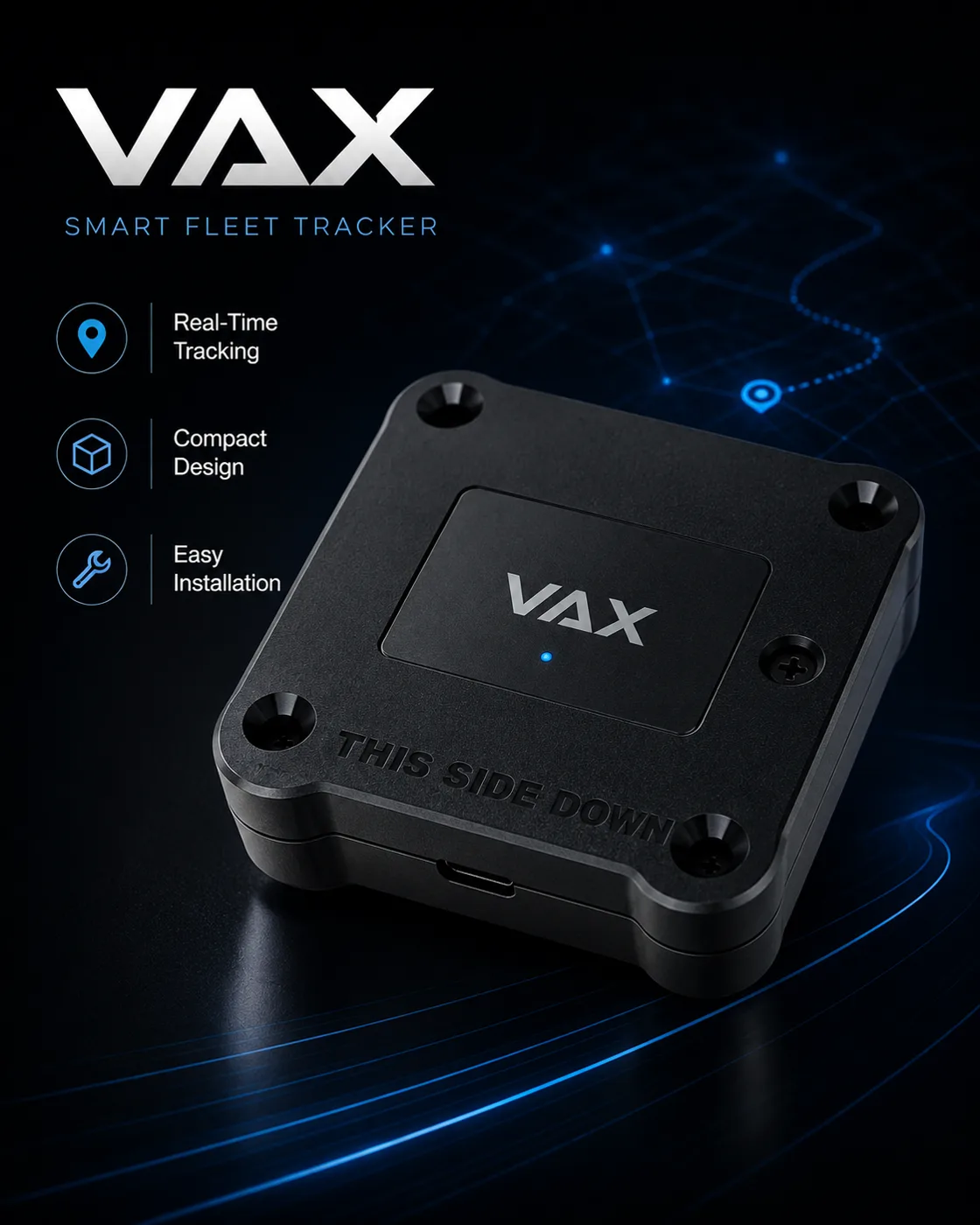
Hardware that works with VAX TMS.
Plan devices
 Billing
POD to confirmed invoice.
See invoicing
 Driver
Your drivers, connected.
Connect drivers
 AI
Ask about progress, follow up on tasks.
Meet Little V
 Safety
Driver and vehicle records.
See safety
 Directory
Reviewed public profiles.
Search carriers
Getting started
Onboarding is assisted, not self-serve. We map VAX to your operation, then hand the keys to your team.
01 Step 1
DiscoverWe learn your fleet and how loads, drivers and paperwork run today.
02 Step 2
ConfigureVehicles, drivers, permissions and documents are set up to match how you run.
03 Step 3
GoWe run the first load with your team in English or Chinese. Migration scope, device compatibility and go-live timing are confirmed with you.
Open the system demo, or prepare an onboarding request in Chinese or English.
4steps
Load to confirmed invoice
2languages
English and Chinese
3surfaces
Web, driver app, Little V
1record
Per load, for the whole team
